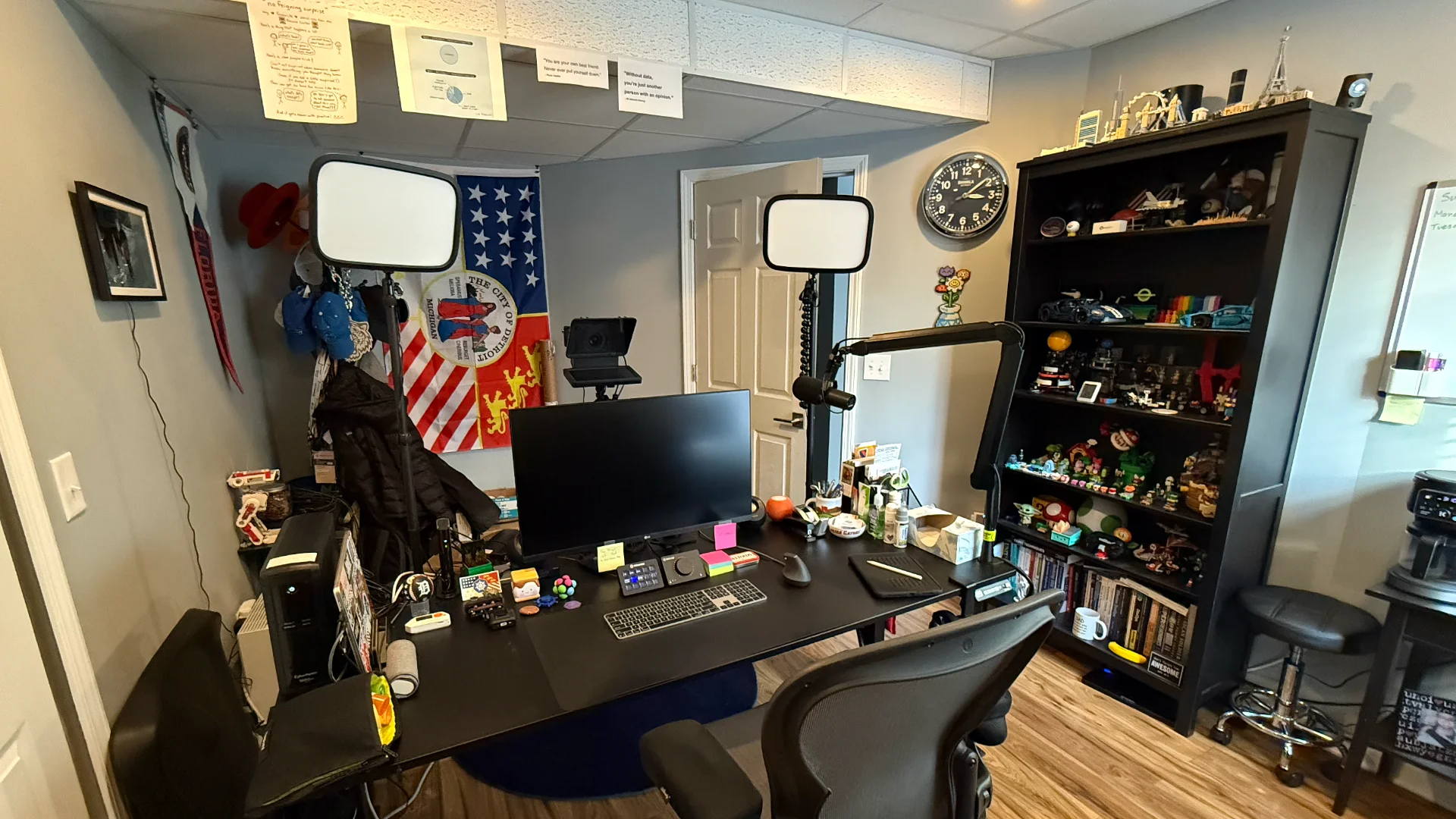
There’s a metaphor out there that you should write about something if you are asked about it more than three times. I cannot count how many times folks ask about my setup, so I’ll capture it here. I also haven’t posted anything about my desk since we finished our basement, which includes my office. Actually the last time I wrote about this was five years ago, almost to the day.
Note: I may earn compensation for sales from links on this post through affiliate programs.
Camera
Webcams are cheap and lack features that you may want (like bokeh). But, unless you’re recording/streaming tons of content, those features may be less important to you. If you want something that “just works,” use your laptop’s built-in camera. Modern phones can double as a camera for desktop use, too (which you already paid for).
If you want to improve picture quality on a budget, go with a 1080p or 4K webcam from Logitech or Elgato.
If you want a very clean look with better-than-webcam quality, you’ll need to be ready to spend some money. I use an old Sony A6000 mirrorless DSLR I got on eBay, connected to my computer via an Elgato Cam Link 4K. If money were no object and I were looking to purchase something new, I’d go with the Sony Alpha ZV-E10. But it’s $800 without a lens.
If that’s not your cup of tea, go with a used camera body only and seriously consider a last-generation camera from a well-known brand, paired with a Sigma lens (used or new). I’m currently using a Sigma 30mm lens, which gives me the most bokeh in my somewhat spacious setting. If you’re in a tighter spot, you’ll want a Sigma 16mm lens. You can’t go wrong with Sigma.
Teleprompter
One thing I added recently to my setup was a teleprompter. I didn’t need a studio-grade device; I wanted something all-in-one that was lightweight, so I wouldn’t have to spend more money on a bigger arm to accommodate the weight of the prompter, iPad, and camera. For my use, the Elgato Prompter fits right in with its dedicated screen, versatility, and lightweight form factor. There may be a larger version out there somewhere that works better for you. It’s worth doing your research here.
Lighting
Lighting in my office is multi-tiered. There are four overhead lights, which are cans with Philips Hue Smart color-changing light bulbs. This gives me the ability to light the office however I want to work. The lighting changes based on what I’m doing. In a meeting? The light is brighter and colder. Regular working hours are spent under lighting that works best for reading.
Backlighting is also a thing in my office. For that, I have three Philips Hue Smart Play Light Bars sitting on the work surfaces behind my desk (my back desk, as I call it). To be honest, I even like the color of the lighting that’s on the box (that purple-ish pink is pretty great). These lights come on for most meetings, but not all of them.
For key lights, I used to use whatever was small, cheap, and bright. What I didn’t like about that was that the lights were a single temperature. Yes, they had filters, but they sucked. Brightness was the only thing I could adjust. To resolve this problem in my office I went with two Elgato Key Lights. This allowed me to turn them on and off remotely and adjust the temperature to what works best. There are smaller versions of these lights, but they integrate well into my existing environment.
Audio
Sound quality is often more important than video quality when meeting, live streaming, or giving demos. There is always room to improve sound quality, but usually, the only way to improve video quality is to play with light (or a completely different camera rig). As such, I have a few different ways to bring my voice to the conversation. Something like Apple AirPods typically works fine during a meeting, because not all meetings need low-latency, high-quality sound from a studio-quality microphone. Let’s break down my sound setup.
Microphone
The primary microphone I use is the Shure SM7B (a vocal dynamic microphone). It’s big and sounds great with vocals. Since it’s on a mic arm, it can enter the frame when ready. This, of course, was the best there was during the early days of the pandemic.
But as meetings evolved in the early 2020s, so did the hardware. If I had it all to do over again, I’d probably buy something more compact like the Shure MV7+ with its all-in-one USB-C connection.
I should point out that both these mics do vocals very well. Instruments and other audio types are better served by products tailored to the application. I optimize for voice because that’s mainly the sound I’m producing.
XLR Interface
I used to use the Focusrite Scarlett 2i2, but that was the best available in 2020, and I had gone through a few of them. Last year I switched to the Elgato Wave XLR and haven’t looked back. Switching to this XLR interface allowed me to pull the Cloudlifter CL-1 Mic Activator out of the circuit, which gave me more room on my desk.
The Elgato Wave Link software has some useful filters. I generally don’t use the software because it can consume CPU cycles that are better spent elsewhere, potentially throwing off the sync between the voice and video outputs. This configuration “just works,” which is exactly what I’m going for.
Mic Arm
While I was at Red Hat, I had a real knack for breaking mic arms. I eventually landed on the Heil Sound PL-2T Overhead Broadcast Boom, which worked well for years. But nothing lasts forever. Last year, I noticed the mic arm was starting to get a little wobbly, so I started a search for a replacement.
I wanted something purpose-built for a desk. I didn’t want to have things around the mount point falling off the desk. More importantly, I wanted to be able to move the mic arm mount point to any part of the desk. After a long search, I landed on the Elgato Wave Mic Arm. There’s a newer version of it, Wave Mic Arm MK.2, but I’m not upgrading until I have to.
The detachable riser let me put something on that side of the desk that would’ve been knocked off with a regular mic arm. The motion is fluid and quiet, and I don’t use a shock mount. I can spin it 360 degrees, and the only thing I have to worry about is the XLR cable getting wrapped around the riser. It’s the best mic arm for me, and I’d highly recommend it after several months of use.
Sound System
Oh yeah! You read that right. I have an amazing setup for listening to ANYTHING. From TV, Movies, YouTube videos, or your favorite streaming service. Voice-activated or via AirPlay (or Bluetooth), I can connect every device in the house to it.
Two Sonos Era 100s are across the office from each other. But that wasn’t enough. The flooring in my office is sound-dampening thanks to some thick insulation under it. This enabled me to get a Sonos Sub Mini to make a 2.1 stereo sound system on steroids without disturbing folks in other parts of the house. Sonos has a good veteran’s discount, too.
Desk
My desk has not changed since the last time I wrote about it. I still have my Fully Jarvis 72" Standing Desk with casters. The one thing that changed was that Jarvis was acquired by Herman Miller. If I had it to do over again, I would have gotten a natural wood desktop that was thicker to make mounting gear to it easier.
Don’t sleep on having a desk on wheels. It opens up a number of scenarios, like Nerf battles, moving in and out of the sunlight during the day, and rearranging your office on a whim one day.
I still have redundancies like a UPS on everything here in the house, including one on the desk. While I was at AWS, the power went out during a meeting, and I was still online. Folks marveled at that for a minute, we finished our meeting, and then it was time to shut things down because the UPS was beeping prior to shutting off altogether.
Conclusion
It’s worth noting that I didn’t sit down one day and order all this gear. I acquired it throughout years of working from home. Please don’t feel compelled to buy everything at once. Most of these things are modular and can be swapped in and out with relative ease. Please don’t go broke making your desk setup like mine is all I ask. Also, be sure to explore options that might better fit your budget or environment because I am certain you can spend less than I did for the same type of setting.