A simple, yet powerful search engine optimization (SEO) checklist

SEO Checklist

This SEO Checklist is one of many that can be found on the Internet. What makes this SEO checklist different than everyone elses is that it’s accurate and simple. It’s a listing of all the search engine optimization used across various web sites I own or manage. This list has been developed using suggestions from just about every major SEO checklist on the World Wide Web. All of the checklists on the web are different, this one will be to, however, this is a well thought out checklist using the best recommendations from all over the Internet including a few recommendations of my own. ...

January 5, 2005 · Chris Short
Web Site Design Do's and Don'ts

Web Site Design Do's and Don'ts

Domain Name Picking a Domain Name can be difficult but usually it’s best to get a name that uses keywords that form a unique name (Keyword1 + Keyword2 = Unique Web Site name). “Brandable” URLs are desirable too (like Google, Overture, Amazon, etc.). Make filenames of images, directories, etc. into keywords and be sure to use hyphens (-) as opposed to underscores (_) in filenames as well. Title Tag The <title> </title> tag should appear immediately after the <head> tag. It should be page specific, simple, and to the point. Don’t try to make your page number one in search engine rankings with the title alone. Bare in mind that the title of a web page is how the majority of your visitors will first “see” your page in a search engine. Search engines factor in the title of a page as a larger chunk of their algorithms when determining what order to display web pages in their indexes. ...

January 5, 2005 · Chris Short

Windows XP and Big Hard Drives

After having issues with a Western Digital 200 GB hard drive and Windows XP I thought it would be beneficial to put my notes into some sort of guide for other people that might have a problem with Windows and drives that are bigger than 137 GB (128 GB binary). Windows XP Service Pack 1 eliminates the 137 GB (128 GB binary) barrier (Windows XP SP1 includes 48-bit LBA support for ATAPI disk drives). The Microsoft Knowledge Base Article: How to Enable 48-bit Logical Block Addressing Support for ATAPI Disk Drives in Windows XP is something everyone should read if they are having the problem of a large hard drive not being completely recognized. This Knowledge Base Article could help you solve your problem quickly but if it doesn’t then continue reading. Do bare in mind that you MUST have Windows XP SP1 to use a hard disk that has a capacity that is greater than 137 GB. ...

January 5, 2005 · Chris Short

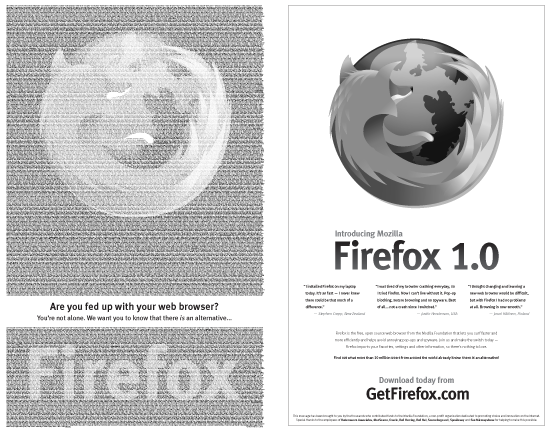
Firefox Hits the NY Times

Firefox has taken out a two-page ad in the New York Times! According to Firefox this is the, “largest open source fundraising campaign in history” and, “these folks were willing to put their name out there and be the first to publicly support Firefox and our community at a scale never before attempted in open source history.” Somewhere in that massive list of names is mine. I will be picking up a New York Times some time today to see how good this Firefox ad looks on two full pages. ...

December 17, 2004 · Chris Short

VeriSign's rapid DNS updates in .com and .net

SlashDot is running a story saying that the twice a day DNS updates of .com and .net domains will cease to exist; VeriSign Naming and Directory Services will be switching to a near real-time system on September 8, 2004. From the announcement: After the rapid DNS update is implemented, the elapsed time from registrars’ add or change operations to the visibility of those adds or changes in all 13 .com/.net authoritative name servers is expected to average less than five minutes. ...

November 6, 2004 · Chris Short